Tiny Titans screen and back-testing
using Portfolio123
The data to create a Tiny Titans screen in the Portfolio123 Stock Screener is available. Several features of this online screener allow you to go beyond the basic screen. Portfolio123 is a fee-based screener.
After you login and navigate to the screener, select the "RULES" tab. You get a blank screen grid and must enter criteria unique to the Tiny Titans. Add a free form rule and then select the required criteria to get the results shown below.
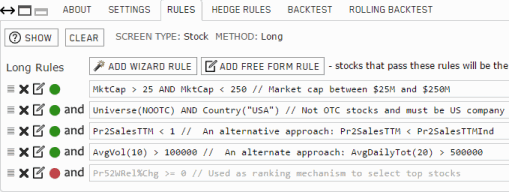
Implementing the Tiny Titans screen
The Tiny Titans screen looks for market cap (inflation adjusted to 2004) between US $25 million and US $250 million. Instead of 2 lines on the screen it was combined in one line with an AND. Any line of a screen can be an "AND" or an "OR". The market cap is in $US millions so 25 and 250 are used for the values.
Price to Sales (P/S) for the trailing 12 months should be less than one by definition so use 1.0 as the value. The industry relative variation of P/S (shown in the notation on the same line) is available and could be used instead of an absolute value.
Average Daily Trading Volume for the last 10 days is set to a minimum of 100,000 shares per day. An interesting alternative would be to use a minimum dollar volume trade. For example, we could have insisted on a minimum of $500,000 per day of trading volume dollars average over the last 20 days.
Excluding OTC stocks is as easy as choosing the corresponding "No OTC Exchanges" universe (NOOTC). Setting the country is an included function.
Finally, the Tiny Titans strategy looks for the 25 stocks with the best 52 week price appreciation. The 52 week price change has been excluded as a rule because it is used as the ranking mechanism. For this, use the "SETTINGS" tab.
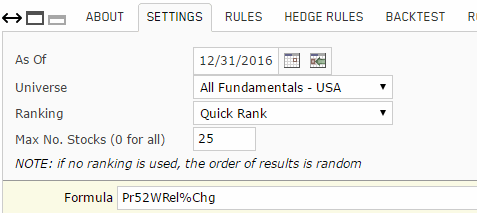
Set the maximum number of stocks to 25. After selecting "Quick Rank" as the ranking method, select 52 week % price change as the ranking criteria. Higher is better.
The SETTINGS tab is where the benchmark is selected. Since this is a micro cap screen, we chose the Russell 2000 as the appropriate benchmark. This is not part of the Tiny Titans screen but is a nice touch if you want to compare performance against a benchmark other than the S&P 500.
NOTE: Proprietary Portfolio123 ranking systems are also available and offer multi-factor ranking. At least one of these systems will often provide superior performance over Quick Rank ranking. If you are serious about performance, this fee-based system is worth the price just for access to the ranking systems.
Save the screen by name using Save As.
Running the screen
Use "Run" or go to the Results tab to run the Tiny Titans screen and identify the 25 passing companies.
You can scroll through the 25 results and examine their fundamentals and charts. Any field in the view can be used to sort the results.
Portfolio123 Variations and Back-testing
As noted above, variations are possible. To choose an industry relative P/S instead of an absolute value is simple. Replace the "1" in the P/S equation with the Industry P/S for the trailing 12 months (TTM) as in the sample above.
The reason Portfolio123 is the gold standard of stock screening tools is back-testing. Below is the back-tested results of the Tiny Titans screen created above for the period Jan 1, 2009 to Dec 31, 2016.
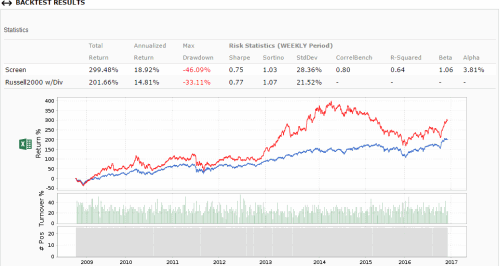
From the results, the volatility of micro cap strategies is pretty clear. If we had examined this back-test of Tiny Titans at the start of 2014, we would have been ecstatic. If we had begun using it at that time, we would not be nearly so happy.
Please note that it is a serious mistake to over-optimize a screen until the back-testing confirms some of your ideas. Adding a quality type of factor or a financial stability factor is often a good idea if one is not already included in the screen. Changing a number from 100,000 to 110,000 to improve results is not.
Tiny Titans Simulation
Another reason this product is head and shoulders above the rest, is the ability to simulate a strategy. Simulation allows both buy and sell rules, not just buy rules.
So once you have identified buys, you keep them until the sell rules execute. When the sell rules execute, the buy rules execute to replace the stocks that are sold. The strength of this is not just the time saved, it is because the sell rules are different than the buy rules. So a position does not need to continue to meet the buy rules; it can be held until it violates one or more of the sell rules.
In the case of a Tiny Titans simulation, a sell rule might be that the P/S ratio exceeds 1.5. If the stock is gaining in price, it will at some point exceed a P/S ratio of 1 unless sales also rise. But as it changes, it will no longer pass the buy criteria. Of course, you can backtest to see what makes sense.
Portfolio123 Stock Screener Review
If you sign up for the 15 day free trial of Portfolio123 (30 days if you sign up from here) you can run screens, simulations, manage portfolios, and back-test this strategy, one of Portfolio123's 30 plus pre-built strategies, or an investing strategy you create.
-
101 Home
›
-
Strategies
›
-
Titans
›
-
Screeners
›
-
Portfolio123
HOME | Site Policies | Contact Us | About Me | About Site | Site Map
Popular Pages
CANSLIM Strategy
Folio Investing
Economic Indicators
Portfolio123
Ranking Systems
New
We value your suggestions, comments, and questions.
Our goal is to make this site as useful as possible.
Contact Us
Thanks!
Stock screening tools and consistent, sustainable investing processes.
About Me
Why build a website instead of a blog?
About this site
Updated Dec 2016