Tiny Titans screen
using SmartMoney Stock Screener
All the data is available to create a Tiny Titans screen in the SmartMoney Stock Screener. Keep in mind that SmartMoney is a fee based screener and is only available online.
The SmartMoney screener is no longer available.
We have retained the following for reference
Once you log into the screener, you get a blank screener grid and must identify Variables, Conditions, and Values unique to the Tiny Titans.
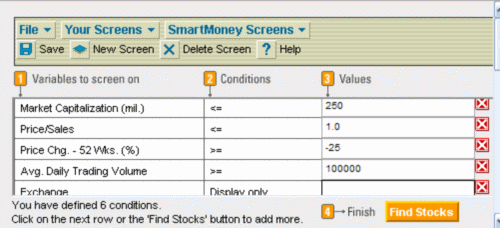
Only 5 of the screen rows are viewable at one time so I ignored the first Market Cap row for the above screen shot.
Implementing the Tiny Titans screen
The Tiny Titans strategy looks for market cap (inflation adjusted to 2004) between US $25 million and US $250 million. This requires two lines in the screen. The variable Market Capitalization (mil.) is in $US millions so use 25 and 250 for the values.
Stock P/S (Price/Sales) should be less than one by definition so use 1.0 as the value. The sample uses <= rather than <. Your choice how exact you want to be.
It is possible to substitute a market percentile rank for Price to Sales Ratio in SmartMoney in place of the absolute value. This may be an interesting alternative if you notice that the average P/S value for the market is less than 1.
To choose a relative P/S, in the Conditions column simply replace the <= with “Bottom % in All”. Then, in the value column enter the value of the percentage you want. NOTE: The % symbol is not required. You could also us “Bottom % in Industry” or “Bottom % in Sector” as variations to the strategy.
I used Avg. Daily Trading Volume (which is the average daily volume over the last 3 months) with a minimum of 100,000 shares traded per day.
It was not clear how to filter out the OTC stocks, so I simply selected the Exchange variable as Display Only. This forces the Exchange to display in the results view. You will need to manually eliminate OTC stocks.
Finally, the Tiny Titans strategy looks for the 25 stocks with the best 52 week price appreciation. Select the Price Chg. – 52 Wks. (%) variable and adjust the value until at least 25 stocks appear in the results.
Once the screen is run (press Find Stocks) you will need to sort the results by the 52 week price change. Use the "Make Report" button to create a report which can be exported. You can save your screening criteria by name.
Variations and Back-testing
SmartMoney does not offer proprietary indicators or rankings in their stock screener. They do, however, offer Technical Analysis indicators as a way to further refine a strategy. For example, you could add a variable to limit results to stocks where the 50 day simple moving average (SMA) of the price is above the 200 day SMA.
Fundamental variations to the Tiny Titans screen are limited to changes in the market cap or P/S unless you add other fundamental criteria.
SmartMoney does not currently offer the ability to back-test a strategy within their screener.
-
101 Home
›
-
Strategies
›
-
Titans
›
-
Screeners
›
-
Top of Page
-
101 Home
›
-
Museum
›
-
SmartMoney
›
-
Top of Page
HOME | Site Policies | Contact Us | About Me | About Site | Site Map
Popular Pages
CANSLIM Strategy
Folio Investing
Economic Indicators
Portfolio123
Ranking Systems
New
We value your suggestions, comments, and questions.
Our goal is to make this site as useful as possible.
Contact Us
Thanks!
Stock screening tools and consistent, sustainable investing processes.
About Me
Why build a website instead of a blog?
About this site